
The application manages conversation state
A chat feels continuous because the application supplies or retains conversation state for the model. Earlier material can be selected, summarized, cached, or omitted; the effective context is not necessarily an append-only copy of the full conversation. [source]
Product features called memory or projects work the same way underneath. The application stores notes or files and inserts selected parts into the next request. Does AI learn from your corrections? covers what that does and does not mean.
The context window is the working desk
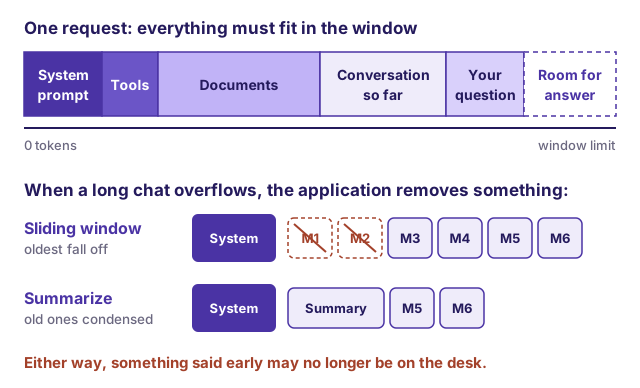
The context window is all the text a model can take into account for one response, including the response itself. [source] Think of it as a desk. Everything the model will use must be on the desk at once: the application's hidden instructions, any tool descriptions, the documents, the conversation history, your question, and room to write the answer.
Sizes vary by model and change often. The GPT-3.5 examples discussed in the 2023 Brex guide used about 4,000 tokens, and the first GPT-4 models with 8,000 or 32,000. [source] As of October 2026, Anthropic documents a 1-million-token window for its current Claude models, with up to 128,000 tokens of output per request, and 200,000 tokens for some older ones. [source] Check the documentation for the product and model you actually use; consumer plans and enterprise plans of the same product can differ.
Leave room for the answer
The limit covers input and output together. If a model's window is 8,000 tokens and the request already uses 7,990, the answer can be at most 10 tokens long, before accounting for other limits; an API may instead reject the request if the requested output exceeds the available space. [source] Long outputs, such as a full chronology or a draft factum, need space reserved for them. Reasoning models also spend tokens thinking before they answer, and those count too. [source]
What happens when the desk is full
When a conversation grows beyond the window, something has to come off the desk. Applications handle this in different ways: [source]
- Sliding window. Keep the hidden instructions; keep only the most recent messages; drop the oldest.
- Selective dropping. Drop your older messages first and keep the model's earlier answers, or the reverse.
- Summarizing. Ask a model to summarize the conversation so far, then replace the old messages with the summary. This is often called compaction.
None of these is lossless. A sliding window can drop the instruction you gave in message three. A summary can turn "proposed, subject to inspection" into "agreed". If a long session starts ignoring something you said early on, assume it may no longer be on the desk. Starting a fresh conversation with a clean, complete brief is often more reliable than correcting a long one.
Fitting is not the same as being read
A larger window lets you supply more, but more is not automatically better. Research found that some models used information at the beginning and end of a long input more reliably than information buried in the middle. [source] Vendors now describe a general decline in accuracy and recall as context grows, which Anthropic calls context rot. [source] The practical rule from both: curate what goes in, rather than adding everything that fits. [source]
What uploading does and does not establish
Seeing a file name in the chat does not show that the model read every page. Depending on the application, an upload may be:
- inserted in full;
- split into passages, with only some retrieved for your question (see How document-grounded AI answers work);
- summarized first;
- run through text extraction or OCR, which can miss handwriting, tables, stamps, and footnotes;
- silently truncated because it did not fit.
What to check
Before relying on an answer from uploaded documents:
- List the files you expected the model to use, and ask it to list the files and page ranges it actually used.
- Test the edges: ask about a table, a footnote, and something on one of the last pages.
- Ask for a document and page or paragraph for each material statement, then open a sample.
- Keep a list of anything that could not be read, such as scanned pages or images.
- In a long session, restate critical instructions near your latest question rather than assuming the early ones are still in play.